Blog · The Shopify Multi-Store SEO Playbook · Part 5
Product structured data per brand: url, brand, shipping and returns
After part 2, every product page named the right brand’s domain in its canonical tag. The JSON-LD on the same page still disagreed. This is how we found it, what we changed in the theme, and which Search Console warnings we chose to leave.
Nifty Design Solutions · Published 2 November 2026 · The series
Disclosure. We built Umbrella. The JSON-LD on our store comes from the theme, not from the app; the theme reads the app’s canonical and brand to fill it in.
Two identities for one product
Most Shopify themes print product structured data from the request: the URL is whatever domain the visitor is on, and the brand is the shop. On a store with one domain that is correct. On ours it meant a Fern & Nest print opened on diviartsstudio.com said, in the same page head:
- canonical: https://www.shopfernandnest.com/products/…
- JSON-LD url: https://www.diviartsstudio.com/products/…, brand: DiviArts Studio
Two different answers to “whose product is this”, one line apart. The canonical was the one we had fixed on purpose. The structured data had simply never been told.
The fix: read the canonical, not the request
Our theme is Ella, and its product JSON-LD lives in snippets/schema.liquid. We changed two values inside a clearly fenced block, leaving the rest of the vendor file alone:
- The origin is read from the output of Umbrella’s canonical snippet, so the JSON-LD URL and the canonical cannot disagree. If the canonical ever changes, the structured data follows.
- The brand is the product’s own Umbrella brand, read through the app’s numeric namespace, app--<id>, not the shop name and not the domain being browsed.
The same product, read from Fern & Nest’s own domain and from DiviArts Studio’s, now gives one answer:
from diviartsstudio.com   url=https://www.shopfernandnest.com/products/gingham-name-sign-…   brand=Fern & Nest
from shopfernandnest.com  url=https://www.shopfernandnest.com/products/gingham-name-sign-…   brand=Fern & Nest
Shipping and returns, per variant
Search Console had been warning on every product that the offers lacked shippingDetails and hasMerchantReturnPolicy. We added both, from a small snippet of our own that each offer renders. The rule we held to: state it only where it is true for that variant.
- Returns follow the store’s refund policy: 30 days, by mail, customer pays return shipping, a 25% restocking fee. Personalised items (a name or a photo on the print) are returnable only if damaged, so their offers declare MerchantReturnNotPermitted.
- Shipping is free to the US and Canada on most of the range, with handling and transit times that match each brand’s Merchant Center settings. Products in paid shipping profiles get no shippingDetails at all, because the rate depends on the cart and any single number would be wrong.
- Digital variants declare neither shipping nor returns. A printable file has nothing to ship.
A DiviArts Studio print, read from the Fern & Nest domain, abridged:
"url": "https://www.diviartsstudio.com/products/blush-pink-wall-art-print-pink-moon-art",
"brand": { "@type": "Brand", "name": "DiviArts Studio" },
"offers": {
  "shippingDetails": [ US: free, handling 2–4 days, transit 4–6 · CA: free, 2–4 + 3–7 ],
  "hasMerchantReturnPolicy": {
    "returnPolicyCategory": "https://schema.org/MerchantReturnFiniteReturnWindow",
    "merchantReturnDays": 30,
    "returnMethod": "https://schema.org/ReturnByMail",
    "returnFees": "https://schema.org/ReturnFeesCustomerResponsibility",
    "restockingFee": 25
  }
}
The snippet carries a comment that says so in capitals: if the refund policy, a shipping profile or a Merchant Center delivery time changes, this file changes in the same step. Part 6 is what happens when those three drift apart.
Warnings we left on purpose
DiviArts Studio’s Merchant listings report, last updated 21 October 2026, the day before this change went live:
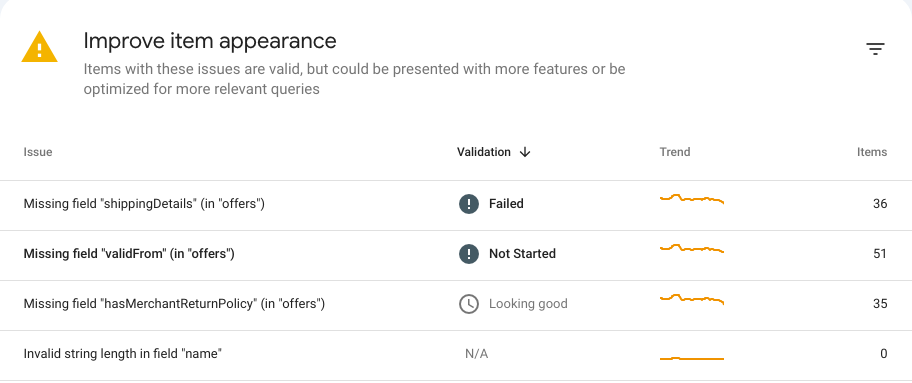
These are “improve item appearance” warnings, not errors, and some of them will stay:
- shippingDetails on paid-profile and digital products. Adding a made-up rate to clear the warning would put a false statement in the markup. A warning is better than a wrong price.
- validFrom, which only applies to offers with a start date. Ours do not have one.
The return-policy row was already validating when this was captured. We will report what the next update shows in the series’ results post, as data, without claiming it caused anything.
Check it yourself
Pull the Product JSON-LD from a page on a domain that is not the product’s own, and print its url and brand. A plain grep is not enough here: Shopify pages carry other JSON with url keys in it.
curl -s https://www.shopfernandnest.com/products/blush-pink-wall-art-print-pink-moon-art | python3 -c '
import sys, re, json
for s in re.findall(r"application/ld\+json[^>]*>(.*?)</script>", sys.stdin.read(), re.S):
    try: o = json.loads(s)
    except ValueError: continue
    if isinstance(o, dict) and o.get("@type") == "Product": print(o["url"], "|", o["brand"]["name"])'
https://www.diviartsstudio.com/products/blush-pink-wall-art-print-pink-moon-art | DiviArts Studio
Or paste the URL into Google’s Rich Results Test, which reads the same markup.
Next
Part 6 is Merchant Center: one account per brand, a feed per brand, and a return policy that Google rejected because the website said something different.
- Previous: Part 4. The Cloudflare setting that overrode our robots.txt
- Next, coming soon: Part 6. Google Merchant Center for three brands, and the return policy that did not match
- The series and the full checklist