Blog · The Shopify Multi-Store SEO Playbook · Part 4
The Cloudflare setting that overrode our robots.txt
This one happened on Umbrella’s own site, not on the store. The robots.txt in our repo was not the one being served, and three AI crawlers were getting 403 on every page. It is in this series because the lesson applies to any domain with something in front of it.
Nifty Design Solutions · Published 30 October 2026 · The series
How we found it
On 20 October 2026 we audited our own site with the same checks this series runs on the store: fetch each file from outside and compare it with what we think we published. The repo’s robots.txt is 53 lines. It allows everything and lists the AI crawlers by name, on purpose, so the policy is a decision on record rather than a default.
The file served at umbrella.niftydesignsolutions.com/robots.txt began with roughly 130 lines we had never written: Cloudflare’s managed rules, disallowing AI training crawlers. And requests sent with GPTBot, ClaudeBot or CCBot user agents did not get the page at all. They got 403.
Nothing else showed it. The repo was right, the deploy was right, and the diff was empty. The site is on Cloudflare’s network, and the change was made on the way out.
The setting
It is in the Cloudflare dashboard for the zone, under Security › Settings › Configure AI bot policies. Two parts of it did this:
- Training: Disallow. Blocks crawlers that collect content for model training. That is where the 403s came from.
- Bot Preference Sync: on. Prepends Cloudflare’s own rules to your robots.txt, so the served file states the block too. That is where the extra 130 lines came from.
The setting applies to the whole zone. Ours is niftydesignsolutions.com, so it covered Umbrella’s subdomain and the company site alike.
What we changed
On 21 October 2026 we set all three categories to Allow and turned Bot Preference Sync off:
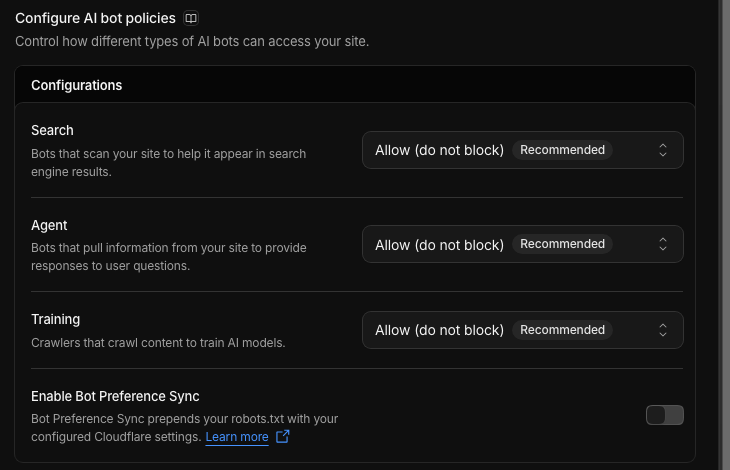
That is a choice for our site, not a recommendation for yours. A page that exists to explain what a product does is one we want agents to be able to read and quote. A site with different content may well want the block. What mattered was that the decision sat in our robots.txt where we could see it, not in a dashboard toggle that rewrote the file.
The check to keep
Fetch the file from outside and compare it with your source, then request a page as a crawler would:
curl -s https://your-domain.com/robots.txt | head -20
for ua in GPTBot/1.1 ClaudeBot/1.0 CCBot/2.0 Googlebot/2.1; do
  printf "%-14s " $ua
  curl -s -o /dev/null -w "%{http_code}\n" -A "Mozilla/5.0 (compatible; $ua)" https://your-domain.com/
done
Our site, on 23 October 2026:
GPTBot/1.1     200
ClaudeBot/1.0  200
CCBot/2.0      200
Googlebot/2.1  200
Two things that are not problems: Python’s default user agent still gets 403 from Cloudflare’s Browser Integrity Check on our site, which is meant to stop scripts that do not identify themselves, so set a user agent when you script this. And a user agent string proves nothing about who sent it; this test shows what the proxy does to a name, not what a real crawler will be served.
Does this affect a Shopify store?
It can. On our store, diviartsstudio.com is proxied through our own Cloudflare zone, so its storefront traffic passes through the same kind of settings. The other two brand domains point straight at Shopify. The robots.txt itself comes from the theme’s robots.txt.liquid, and your Shopify admin only ever shows you that version.
So we ran the same test on all three on 23 October 2026. Each returned 200 to all three crawler names, and each served the theme’s file, whose first line is Umbrella’s header, with nothing prepended:
www.diviartsstudio.com     200 200 200
www.shopfernandnest.com    200 200 200
www.foreverartify.com      200 200 200
If any proxy, CDN or bot-protection service sits in front of your storefront, run the check after every change to it. Whatever sits there can rewrite the file the theme generates, and nothing in Shopify will tell you.
Next
Part 5 goes back to the store: product structured data, and why ours contradicted the canonical until the JSON-LD was taught which brand a product belongs to.
- Previous: Part 3. Search Console for three brand domains: properties, sitemaps and what the reports said
- Next, coming soon: Part 5. Product structured data per brand: url, brand, shipping and returns
- The series and the full checklist