Blog · The Shopify Multi-Store SEO Playbook · Part 2
Setting up Umbrella on a live store: per-brand sitemaps, canonicals and robots.txt
Part 1 ended with two files Shopify does not vary by domain. This is how we changed them on our own store, step by step, and how to check the result from outside without trusting the app’s word for it.
Nifty Design Solutions · Published 26 October 2026 · The series
Disclosure. We built Umbrella. Our store runs it as a private install of the same app that is on the App Store, so the screens below match what a merchant sees, apart from billing.
Step 1: the domains, in Shopify
Nothing in Umbrella works until Shopify serves each brand on its own hostname. Under Settings › Domains our store has three brand domains, each with its www form, and none of them redirecting to the primary.
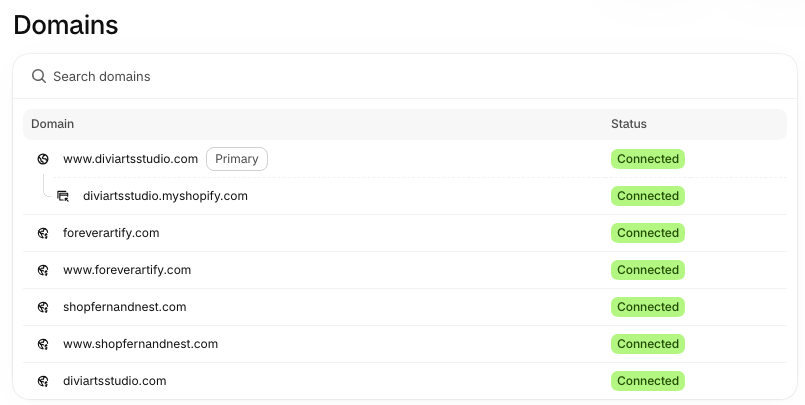
A www and bare pair is one storefront, not two. Umbrella treats them as one, which matters because a canonical is an exact match: shopfernandnest.com and www.shopfernandnest.com are different strings. The redirect-or-alias setting explained.
Step 2: brands, and who owns what
The app reads the domains already attached to the store and asks which are separate brands. We made three: DiviArts Studio, Fern & Nest and Forever Artify. Each brand record holds its name, domain, logo and social profiles.
Then every product, collection, page and blog was assigned to the brand that owns it, through one metafield. Two rules made this manageable:
- Unassigned means primary. Anything without a brand stays with DiviArts Studio. So we only had to assign the nursery and custom ranges; the wall art was already right.
- Articles inherit from their blog. A whole blog can be assigned in one move. That one comes back in part 8, because we got it wrong.
Step 3: the one edit inside the theme
Sitemaps and robots.txt can be published from outside the theme. The canonical tag cannot: it lives in the layout, so the theme’s own tag is replaced with one line that renders the brand-aware version:
{% render 'umbrella-canonical' %}
Our theme is Ella, and its canonical sits in layout/theme.liquid. The app found it there, showed the before and after, and saved the original into the theme as a backup before replacing it. Replace, not add: two canonical tags on one page is worse than one wrong one.
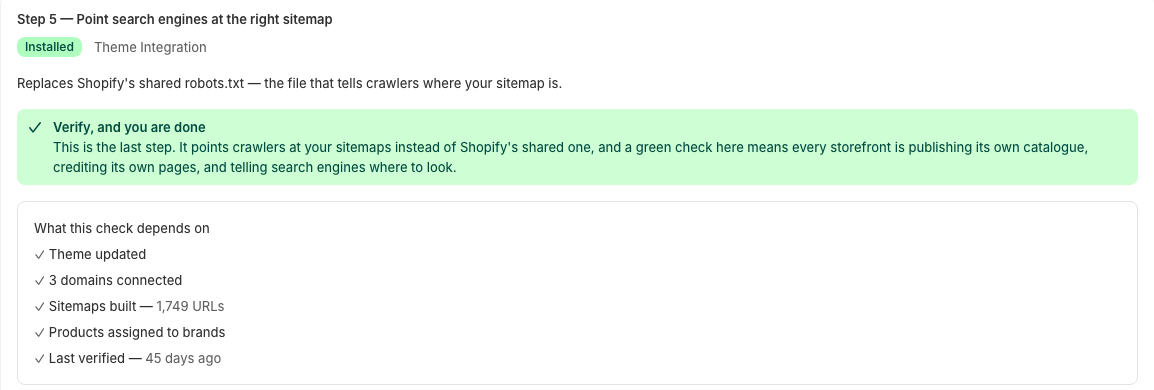
The last step replaces Shopify’s robots.txt template. Umbrella’s keeps every rule Shopify ships and changes the sitemap lines. The setup screen lists what the final check depends on:
What each domain publishes now
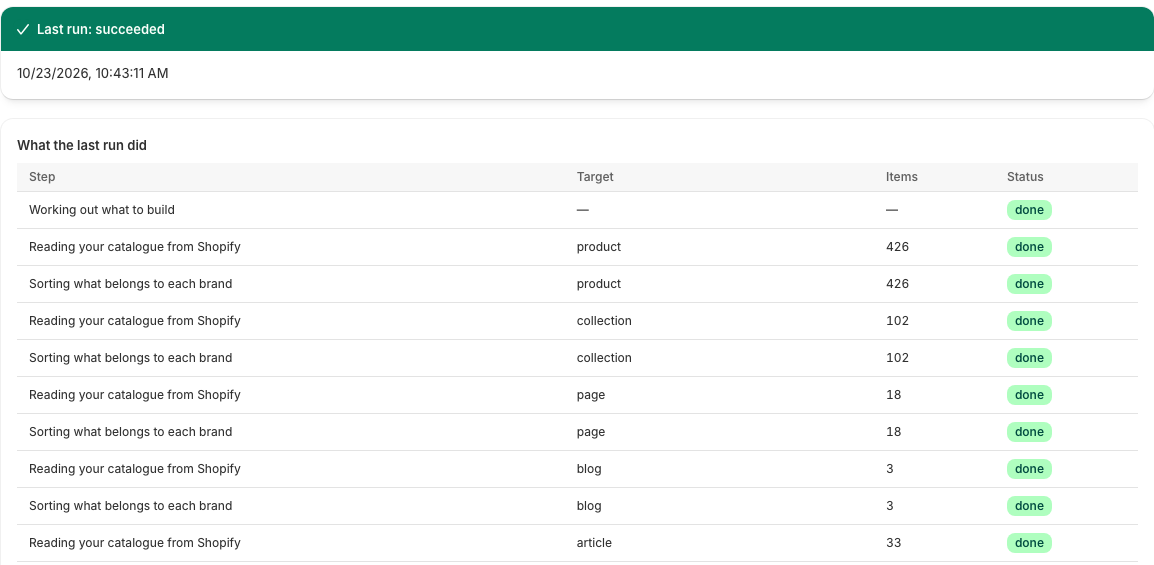
Each build reads the catalogue, sorts it by brand and writes one sitemap index per storefront. This is the most recent build on our store, on 23 October 2026:
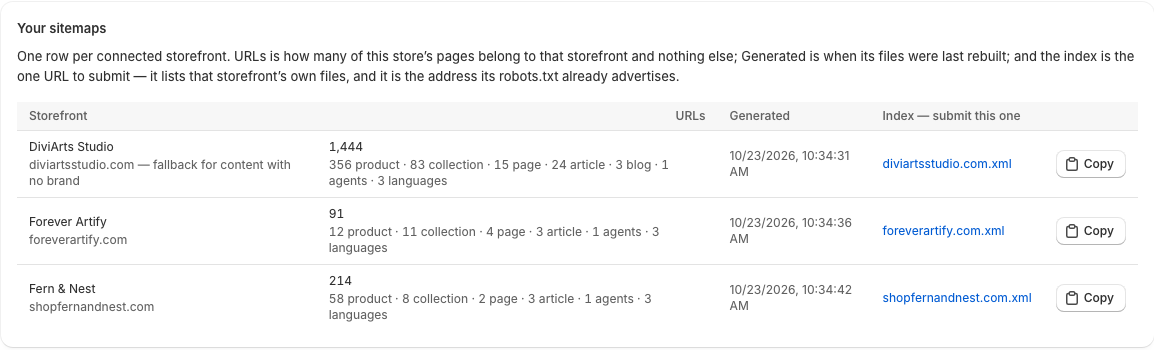
Before the app checks anything else, it compares its total against Shopify’s own sitemap. On that run Shopify listed 1,740 pages and Umbrella published 1,749 across three storefronts, and nothing in Shopify’s sitemap was missing from Umbrella’s. The extra nine are each storefront’s homepage and metaobject pages, which Shopify’s sitemap does not list.
Check it yourself
None of this needs our word. Three commands, against domains you can reach right now.
What robots.txt points at. Each domain names its own sitemap, and Shopify’s default sitemap is disallowed:
curl -s https://www.shopfernandnest.com/robots.txt | grep -E "^Sitemap|Disallow: /sitemap.xml"
Disallow: /sitemap.xml          # 7 times, once per crawler group
Sitemap: https://umbrella-sitemaps.niftydesignsolutions.com/…/shopfernandnest.com.xml
How many product URLs each domain claims. We counted the product URLs on 23 October 2026, in Shopify’s default sitemap and in each brand’s Umbrella sitemap. The counts include each product’s three language versions:
| Domain | Shopify’s sitemap | Umbrella’s sitemap |
|---|---|---|
| diviartsstudio.com | 1,278 | 1,068 |
| shopfernandnest.com | 1,278 | 174 |
| foreverartify.com | 1,278 | 36 |
Shopify’s column is the same on every domain, because it is the same file. Umbrella’s column adds up to 1,278: each product URL in exactly one brand’s sitemap.
Which domain a product credits. Request a Fern & Nest product from all three hostnames and read the canonical:
for d in diviartsstudio.com shopfernandnest.com foreverartify.com; do
  curl -s https://www.$d/products/gingham-name-sign-nursery-boy-print-monogram-wall-art-custom-printable-baby-room-decor \
    | grep -o '<link rel="canonical"[^>]*>'
done
All three answers name www.shopfernandnest.com. Before the setup, all three named www.diviartsstudio.com.
What we hit on the way
- Brand data read the wrong way in theme code. Umbrella’s fields belong to the app. Inside the app’s own blocks the short $app: form works; in the merchant’s theme it resolves to nothing, so our first canonical quietly fell back to the primary domain on every product. Theme code has to address the data by the app’s numeric id, app--<id>. The app’s Theme code page gives you the id and the Liquid.
- Apex domains that 301 to www. Shopify redirects each bare domain to its www form. Sitemaps written with the bare host would have listed URLs that redirect. The setup now records the host each storefront actually serves from.
- Two canonicals. On one theme version the layout rendered the snippet with whitespace-stripping tags, the installer did not recognise its own line, and a second render was added. Searching the rendered page for rel="canonical" and counting is the quickest test after any theme update.
Next
Part 3 submits these sitemaps to Search Console, one property per brand, and reads what the Page indexing report says about a domain whose pages now name a different domain as their canonical.